


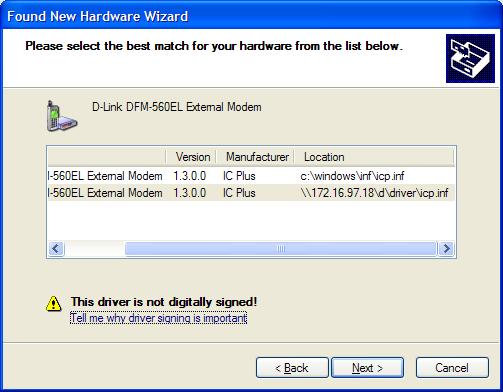
While installing a new modem, I found “This Driver Is Not Digitally Signed” warning when selecting the driver that goes with the modem. See screen shot here. What does it mean? Microsoft says…
Windows device drivers and operating system files have been digitally signed by Microsoft to ensure their quality. A Microsoft digital signature is your assurance that a particular file has met a certain level of testing, and that the file has not been altered or overwritten by another program’s installation process.
Depending on how your administrator has configured your computer, Windows either ignores device drivers that are not digitally signed, displays a warning when it detects device drivers that are not digitally signed (the default behavior), or prevents you from installing device drivers without digital signatures. Source: Driver Signing for Windows
So, it means that the driver I have for the modem is not assured by Windows to be of a good quality. Or there is no assurance that it will work well on Windows. Anyway, I ignored the warning and continued my installation. And do you know what happened? The modem doesn’t work properly on Windows Phone Dialer, I have to do some setup tinkering before everything works fine. I can’t make the modem works on my TAPI application! I need to get a new modem (again!!!).
Technorati Tags: TAPI, modem installation, driver signing for windows

Hi all,
I was installing a tape drive and I get the warning <> Can somebody help me? I must install this tape drive to do my backup on a windows 2003 server
kakaasar naman yan…I encountered the same problem on a different device yet it was able to work properly.