


This morning, we are trying to solve a connection problem on our network and one of the requirement is to disable the VPN connection from the firewall. I googled disable vpn on pix and I was brought to a Experts Exchange page.
The answer to my question seems blocked:
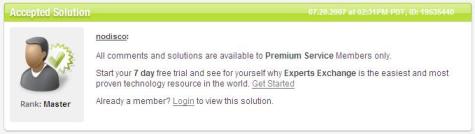
Waah! Where’s The Answer?
They are telling me that I need to become a Premium Service member to view the solution to the problem.
Now, here’s something you should know in case you don’t know yet. That statement is a lie. We don’t need to become a Premium Service member just to view their solution. And no, we don’t need to hack Experts Exchange to view the solution. It is indeed on that page. To see the answer, simply SCROLL DOWN to the bottom of the page.
Here’s a video of what that whole page looks like. Though it’s unreadable, you’ll see the hidden answers at the bottom of the page.
Of course, you can visit that page to see it for yourself.
Remember, if you landed on Experts Exchange for an answer to your problem, you’ll just need to SCROLL DOWN to read their answers. No need to sign up to become a Premium Service member. 😉

oo nga, i noticed that some time ago… i thought they’re not so smart.. or just a bug.. 🙂
nagtaka din ako nyan eh.. nasa baba naman sagot.. baka may super secret answer pa.. haha 😀
potek. yun lng pala yun haha. di ko na iniscroll down dati yan e. pg nkita ko experts exchange di ko na binubuksan haha. thanks for shring this.
huli ka balbon!!!
thanks for that info marghil khit d aq gumagamit nyan. bka in d near future m.encounter q dn. 🙂
Didn’t know this, hehe…Nice nice, thanks for sharing.
uy salamat sa info 🙂
This instructions are really helpful for do follow used in blog, website.
This instructions are really very helpful.Thanks You
thanx macha